What are the ways to start a process in the Appain?
What are the ways to start a process in the Appain?
Answer
Appian has several ways to start a process. Which one fits depends on where the process is initiated, whether user interaction is required, and whether the process needs autoscaling.
1. Starting a process from another process
When one process model needs to start another, there are three main options.
Start Process Smart Service
- Starts another process from an existing process model.
- Runs synchronously (waits for completion) or asynchronously (continues without waiting).
- Lets the process model be selected dynamically.
- Supports process autoscaling.
- Is the recommended choice for most process-to-process scenarios.
For example, when a customer submits an application, the main process triggers a separate process to send confirmation emails without waiting for it to complete.
Use it for background processing, independent workflows, and high-volume processing.
Subprocess Activity
- Starts a child process from a parent process and maintains the parent-child relationship.
- Runs synchronously or asynchronously.
- Lets process variables be passed by reference, subject to configuration.
- Supports parent-child reporting, security inheritance, and activity chaining.
- Is not compatible with autoscale.
For example, a loan approval workflow starts a subprocess for manager approval and waits for the result before proceeding.
Use it for workflows that need a parent-child relationship, shared process variables, or user-task chaining.
Process messaging
- Uses Send Message Events or message-configured End Events to trigger another process.
- The receiving process must have a Start Event configured to receive the message.
- Supports event-driven communication between processes.
- Is generally not recommended for starting new processes when the Start Process Smart Service can achieve the same result.
For example, a process sends an event that triggers another process configured to listen for that event.
Use it for existing message-driven workflows and specific event-based requirements.
2. Starting a process from an interface
a!startProcess()
- An expression function, commonly used in a button's
saveInto. - Starts a process without navigating the user to its start form.
- Runs synchronously or asynchronously.
- Supports autoscaled processes.
- Allows custom success and error handling.
For example, a user clicks a "Send Reminder" button, which triggers a background process to send a notification.
Use it for background operations that don't require the user to complete additional forms.
a!startProcessLink()
- Starts a process when the user clicks a link.
- Displays the process start form or the initial activity-chained user tasks.
- Supports passing process parameters.
- Returns the user to the original interface after the activity chain completes.
An autoscale-enabled process model can be selected, but a process launched through this link runs without autoscaling.
For example, a user clicks "Submit Request" and is taken through multiple forms to complete the request.
Use it for user-initiated workflows involving start forms or activity chaining.
Record actions
- Start processes in the context of a record type.
- Can be configured as record list actions or related actions.
- Can be displayed on record lists, record views, or interfaces using
a!recordActionField(). - Support start forms and activity-chained forms.
- Can initiate autoscaled processes when configured appropriately.
For example, a user opens an Invoice record and clicks "Approve Invoice" to start an approval workflow.
Use them for create, update, approve, reject, and other record-related operations.
3. Starting a process from outside Appian
Web API
- Expose an Appian Web API endpoint.
- Use
a!startProcess()inside the Web API to start a process. - Pass information from the external request as process parameters.
- Supports autoscaled processes and synchronous or asynchronous execution.
For example, an external CRM system calls an Appian Web API to start a customer onboarding workflow.
Use it for REST-based integrations with external applications.
Appian RPA
Robotic workflows can start Appian processes, which is useful when robotic automation and Appian workflows need to work together.
For example, a robot extracts information from a legacy application and starts an Appian process to validate and save the data.
An incoming email can trigger a process through a configured Receive Message Start Event. This is supported for processes running without autoscale.
For example, an incoming support email triggers a process that creates a service request.
Process model exposed as a web service
External systems can invoke a process model through a web service. Processes started this way run without autoscaling, even if autoscale is enabled for the model.
Use it for existing SOAP-based integrations. For new REST integrations, a Web API is generally more suitable.
4. Starting a process automatically
Timer-based Start Event
- Configure a Timer trigger on the process model's Start Event.
- Schedule execution at a specified date, time, or recurring interval. No user interaction is required.
- Scheduled Start Events are supported for process models without autoscale enabled.
Examples:
- Every night at 12 AM, archive completed records.
- Every Monday, send pending approval reminders.
- At the end of each month, generate an invoice summary.
Use it for scheduled jobs, recurring workflows, and periodic maintenance activities.
5. Starting a process from Tempo or Sites
Record actions
Record actions let users start processes associated with specific business records. They can be displayed within record lists, record views, and interfaces.
For example, a user selects an employee record and clicks "Request Employee Transfer".
Application actions
- Expose process models as actions that users can access.
- Can appear in the Actions tab in Tempo.
- Can also be configured as pages in Appian Sites.
- Are primarily intended for attended workflows involving start forms or user tasks. They are not meant for autoscaled background processing.
For example, a user opens a Site and selects "Create New Service Request" to launch a request submission workflow.
6. Starting a process from an Appian Portal
Portals are public-facing interfaces. Use a!startProcess() to start a process from a portal interface. Record actions, start forms, and a!startProcessLink() are not supported in portals.
For example, an external customer submits a registration form through an Appian Portal, and the submission triggers an Appian process to validate and store the information.
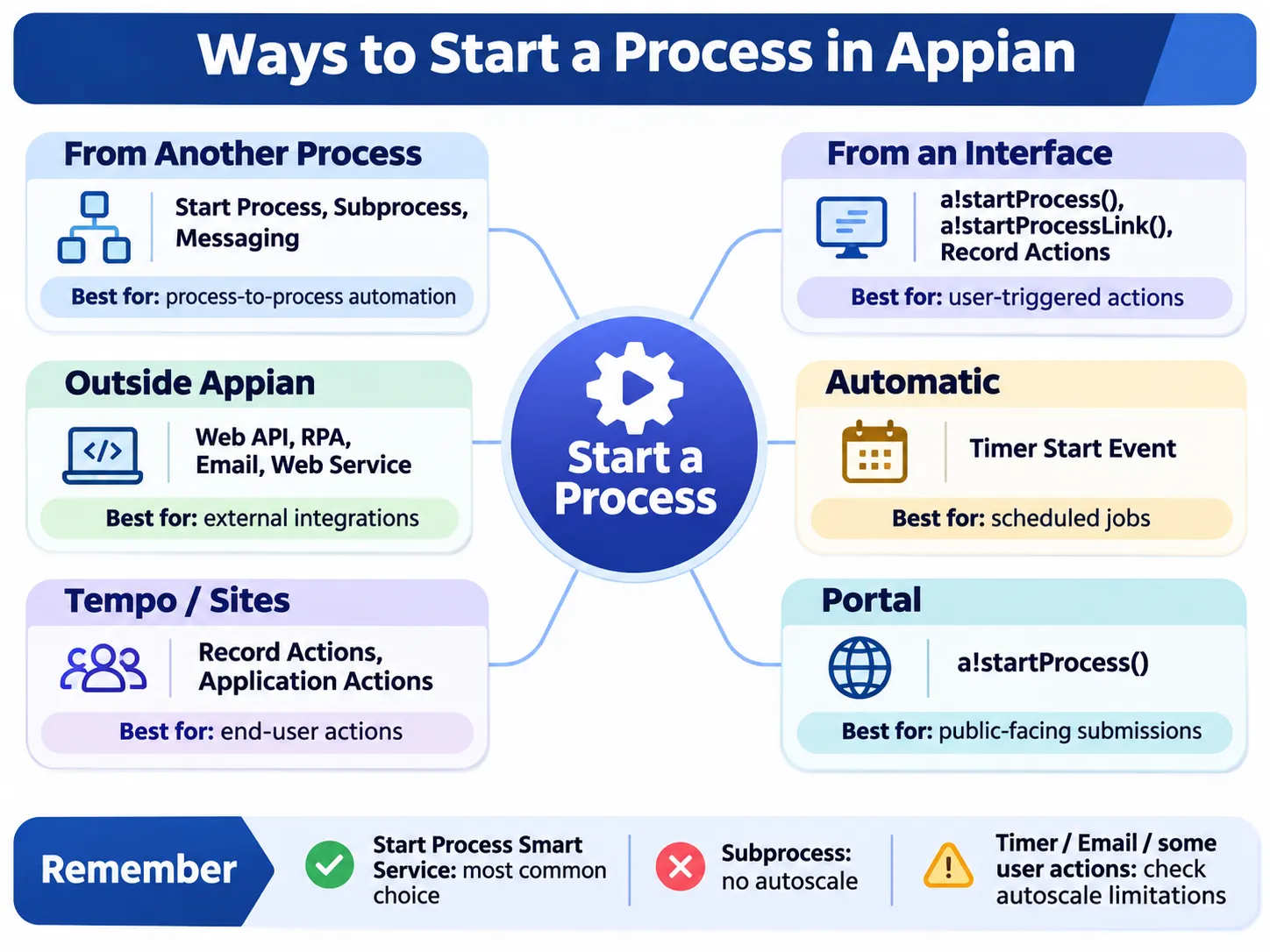
Quick comparison
Method | Recommended use case |
|---|---|
Start Process Smart Service | Starting another process from an existing process |
Subprocess Activity | Parent-child workflows and shared process data |
Process messaging | Message-driven process initiation |
| Starting a background process from an interface |
| Navigating users through process forms |
Record actions | Record-based operations |
Web API | External REST integrations |
RPA | Robotic automation workflows |
Email-triggered processes | |
Web service | External SOAP integrations |
Timer Start Event | Scheduled and recurring jobs |
Application actions | User-initiated workflows in Tempo or Sites |
Portal + | Public-facing process initiation |
Before selecting an approach, check autoscale compatibility, activity chaining, security permissions, and whether the process should run synchronously or asynchronously.