What Is a Hidden Process Variable in Appian, and When Should You Use It?
What Is a Hidden Process Variable in Appian, and When Should You Use It?
Answer
A hidden process variable in Appian is an ordinary process variable (pv!) with the Hidden property turned on. It stores data and passes it between nodes just like any other process variable. The difference is that its values are left out of process history and process reports. That cuts the memory process history uses, which matters most with large datasets or variables that change often.
When should you use hidden process variables?
- Large dataset processing: the process holds hundreds or thousands of records for a while and works on them across several nodes.
- Frequently updated variables: the variable changes again and again, for example inside a loop. Marking it hidden keeps all those updates out of process history.
- API response processing: an external API sends back a large response that you transform or process over several steps, and nobody needs to see it in reports or history.
- Memory optimization: in long-running processes, hidden variables cut the memory spent on storing past variable values.
Practical example: invoice processing
Take an Appian application where a service provider submits an invoice covering 200 forms that were approved earlier.
The process needs to:
- Pull the approved forms from the database.
- Check each form against the eligibility conditions.
- Calculate the available invoice amount.
- Save the eligible forms and the calculated amounts to the database.
While it runs, a variable called pv!formDetails holds the form data it pulled.
If that variable is updated several times during the workflow, recording every change in process history can make the process instance take up more memory.
The fix:
Set pv!formDetails as a hidden process variable.
The process can still read and update it, but Appian won’t record its changes in process history.
This helps most when the application handles large datasets or updates the same variable many times.
How to configure a hidden process variable
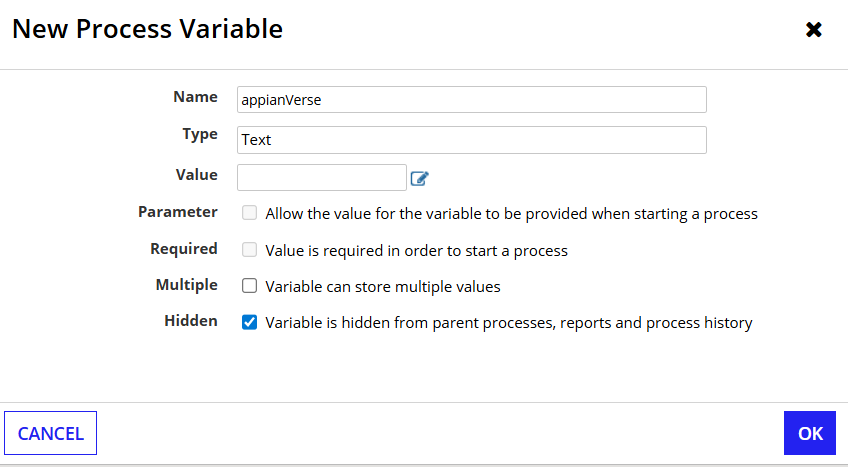
- Open the process model in Appian Designer.
- Go to Process Model Properties > Variables.
- Create a new process variable or edit an existing one.
- Tick the Hidden checkbox.
- Save and publish the process model.
Things to keep in mind
- You can still reference a hidden variable as
pv!variableNameanywhere in the process model. - Authorized users monitoring the process instance can still see its current value.
- You can’t use hidden variables in process reports.
- Process parameters can’t be set as hidden.
- Hiding a variable isn’t a security measure. It doesn’t delete data, and Appian still needs memory to hold the variable’s current value.
Key takeaway
Use a hidden process variable when nodes need to share intermediate data that doesn’t need to stay in process history or show up in process reports. It helps most with large datasets or variables that are updated often.
References:
Check yourself
Question 1 of 3, on what the answer above covers.
- 1.An Appian invoice processing application retrieves 500 approved forms and stores them in pv!formDetails. The variable is updated multiple times during validation and calculations, but its values are not required in process reports.What is the best approach to reduce process history memory consumption?
- 2.An Appian application processes loan applications. The process stores the calculated loan amount in pv!approvedAmount, which is configured as a Hidden Process Variable.The business team now wants to display pv!approvedAmount in a standard Appian process report.What should the developer do?
- 3.An Appian process calls an external API and stores the response in pv!customerDetails.The response contains sensitive customer information. A developer enables the Hidden property, assuming this will prevent unauthorized users from accessing the data.Is this approach sufficient to secure the information?