Can We Change the Security of Multiple Appian Objects at Once?
Can We Change the Security of Multiple Appian Objects at Once?
Answer
Yes. Appian’s Security Summary feature lets you change the security of several objects in an application at once.
Security Summary shows object-level security for the whole application in one place. From there, developers can review permissions, spot security warnings and update security on many objects without opening each one.
How to change object security in bulk
- Open your application in Appian Designer.
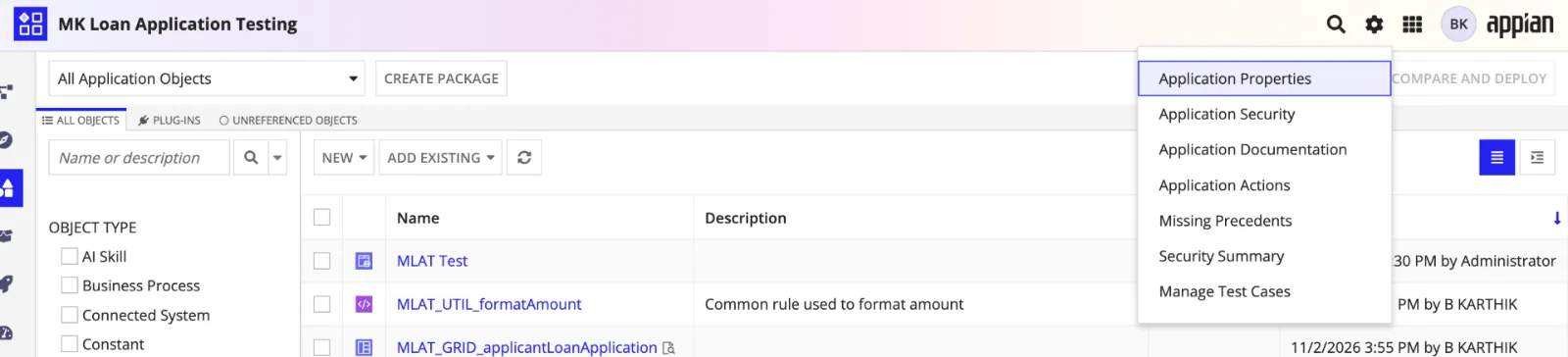
- Click the Application Settings menu (the gear icon).
- Choose Security Summary.
- Appian lists the objects grouped by their security role maps.
- Find the group of objects whose security you want to change.
- Click Edit next to that role map.
- Add or remove groups, or change their permission levels.
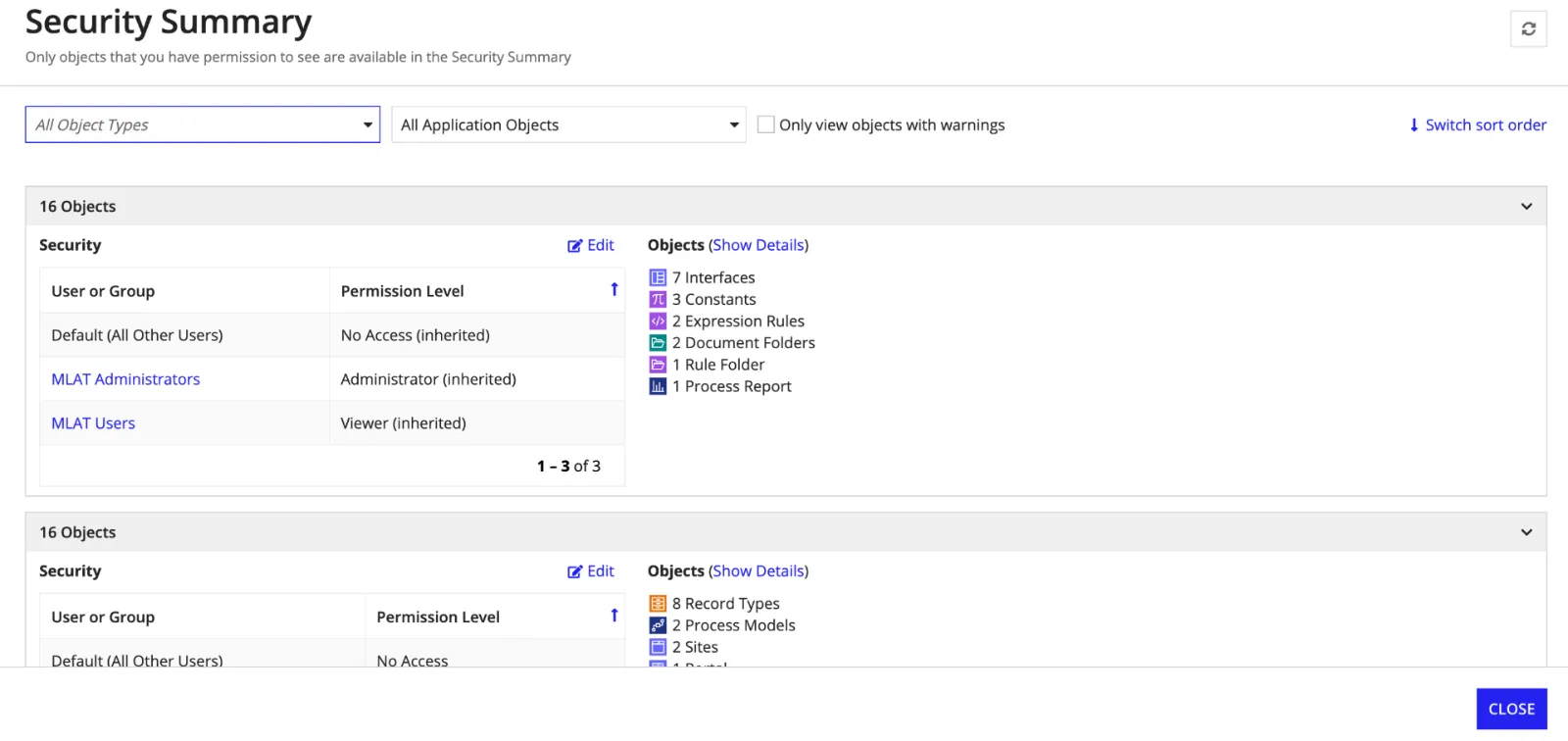
Appian applies the new permissions to every object listed under that role map, wherever the chosen permission levels apply to that object type.
Practical example
Take a Loan Management application with 15 process models that all have the same security setup.
A new business requirement says members of the Loan_Processing_Team group should be able to start these processes.
You don’t have to update all 15 process models one by one:
- Open the application’s Security Summary.
- Find the role map that contains the 15 process models.
- Click Edit.
- Add the
Loan_Processing_Teamgroup. - Give it Initiator permission.
- Save.
Appian applies the new security to every process model in that group.
That saves a lot of repeated configuration and keeps security consistent across the application.
Other uses
- Security review: check the permissions on objects across the whole application.
- Fixing security warnings: find objects that are missing Administrator or other recommended security groups.
- Bulk permission updates: add or change group permissions for objects that share a role map.
- Deployment prep: review object security before you deploy an application or deployment package.
Things to keep in mind
- Security Summary groups objects that have matching security, including permissions they inherit.
- A bulk change affects only the objects in the role-map group you picked. It doesn’t touch every object in the application.
- The available permission levels depend on the object type. For example, Initiator applies to process models but not to expression rules.
- Developers need the right administrative permissions to change object security.
- For objects that inherit security from a parent folder, take the inherited permissions into account.
Key takeaway
Security Summary makes it easier to manage object security in Appian, because you can change every object with the same security setup in one go.
The Security Summary is helpful when:
- Viewing the security of more than one object in an application at a time, or viewing the security of specific object types in an application (for example: all process models, or all sites)
- Finding all objects with missing security (for example: objects with security warnings)
- Editing security or addressing security warnings in bulk
- Reviewing the security of all objects within an application or package before deploying it
Check yourself
Question 1 of 3, on what the answer above covers.
- 1.An Appian Loan Management application contains 20 expression rules. In the Security Summary, 12 rules belong to one role-map grouping, while the remaining 8 belong to another grouping because they have different security configurations.A new requirement is to grant the Loan_Developers group Editor access to all 20 rules.What is the most efficient approach?
- 2.An Appian application's Security Summary displays a grouping containing both Process Models and Expression Rules.A developer edits the role map and grants the Loan_Processing_Team group Initiator permissions.What happens when the developer saves the changes?
- 3.An Appian developer notices that two expression rules have the same groups and permission levels.However, Security Summary displays them in separate role-map groupings.On investigation, one expression rule inherits its security from a parent rule folder, while the other has its permissions configured directly.Why does Appian display them separately?