In Appian, why do we use a Start Form when we already have a User Input Task?
In Appian, why do we use a Start Form when we already have a User Input Task?
Answer
In Appian , Both collect information from users. They differ in when the process starts:
- Start Form: shown before the process starts. The process begins only when the user submits it.
- User Input Task: shown after the process has started, as a task assigned to a user or group.
Key Differences
Feature | Start Form | User Input Task |
|---|---|---|
Process starts | After form submission | Before the task is displayed |
Task assignment | No | Yes |
If user closes the form | No process instance created | Task remains active unless completed or canceled |
Save draft | Not supported by default | Supported |
Task escalation | No | Yes |
Best suited for | Initiating a request | Completing workflow activities |
Example: Invoice Approval
Employees submit invoices and managers approve them.
Step 1: The employee submits an invoice (Start Form)
- The employee clicks the Create Invoice record action.
- Appian shows the Start Form.
- The employee enters the vendor, amount and invoice date.
- If they close the form without submitting, no process starts.
- When they submit, Appian starts the process and saves the invoice.
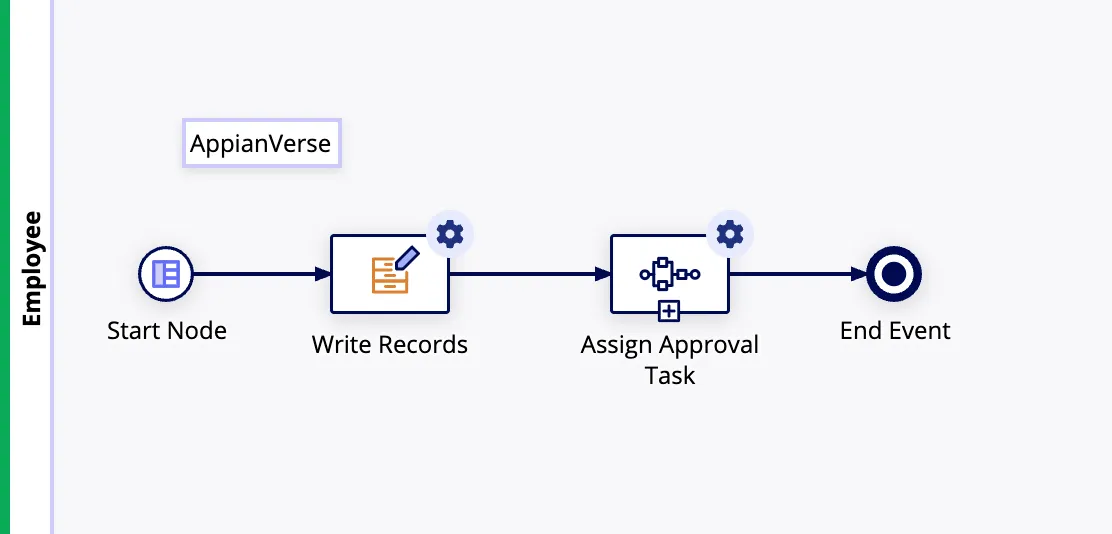
The process instance isn’t needed until the employee submits the invoice. With a Start Form, abandoned forms don’t leave process instances behind.
Step 2: The manager approves it (User Input Task)
- The submitted invoice starts the workflow.
- Appian assigns an Approve Invoice task to the manager.
- The manager opens the task and reviews the invoice.
- If they close the browser without submitting, the task stays active.
- They can come back later to approve or reject it.
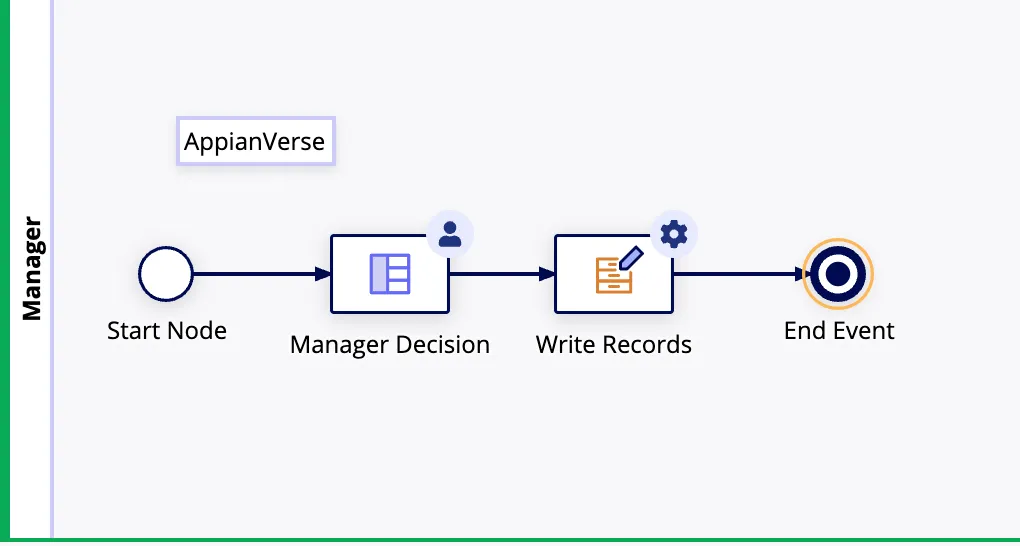
The approval has to go to a specific person or group and be tracked until it’s done. That needs a task.
When to use a User Input Task instead
Need | Example |
|---|---|
Assign work to a user or group | Invoice approval assigned to the Finance Manager |
Save progress and finish later | An employee saves a draft of a long application |
Run automated steps before the form | A Script Task calculates eligibility, then the form appears |
Deadlines, reminders or escalation | Escalate if the manager hasn’t approved within two days |
A process instance must exist before the first form | Tracking the process and task lifecycle from the start |
Note: a User Input Task tracks the process and task lifecycle, but logging every time someone opens the form takes extra audit logging.
Interview answer
“Start Forms and User Input Tasks both collect user input, but Appian shows them at different points in the process.
A Start Form appears before the process starts, and Appian creates the process instance only when the user submits it. That suits actions like creating a request or submitting an invoice, because abandoned forms don’t leave process instances behind.
A User Input Task comes after the process has started. It lets us assign tasks to users or groups, save drafts, configure escalations and track completion.
In an invoice approval app, I’d use a Start Form for employees to submit invoices and a User Input Task to assign approval to managers. So I use Start Forms to start user-driven processes and User Input Tasks for assigned work inside a running workflow.”
References
Check yourself
Question 1 of 3, on what the answer above covers.
- 1.In an Appian application, users click Create Request, enter details, and submit the form. If a user closes the form without submitting, the business does not want a process instance created.Which approach is most suitable?
- 2.After an employee submits an invoice, the manager must review and approve it. The approval should remain in the manager's task list until completed.Which approach should you use?
- 3.In an Appian loan application, the system must retrieve an applicant's credit information from an external API and calculate eligibility before displaying an approval form to a reviewer.Which design is most appropriate?