Consider a process with three parallel approval tasks assigned to three different users. You need to design the process so that if any one user completes their task, the other two pending tasks are automatically canceled, and the process moves to the next stage. How would you approach this design in Appian?
Answer
In Appian, you can do this with parallel User Input Tasks, an AND Gateway and a Terminate Process End Event.
The design depends on what should happen after the first approval: either the whole process ends, or it moves on to the next stage.
Scenario
Take a Loan Approval application where any one of three reviewers can approve a loan application.
The process creates three User Input Tasks at the same time:
- Approval Task 1 → Reviewer A
- Approval Task 2 → Reviewer B
- Approval Task 3 → Reviewer C
Business requirement:
If Reviewer B approves first:
- Reviewer B’s response is captured.
- The pending tasks for Reviewers A and C are canceled automatically.
- The application moves to the next stage without waiting for the other reviewers.
Approach 1: Use a Terminate End Event
If the whole process should end after the first approval, you can use a Terminate Process End Event.
Implementation:
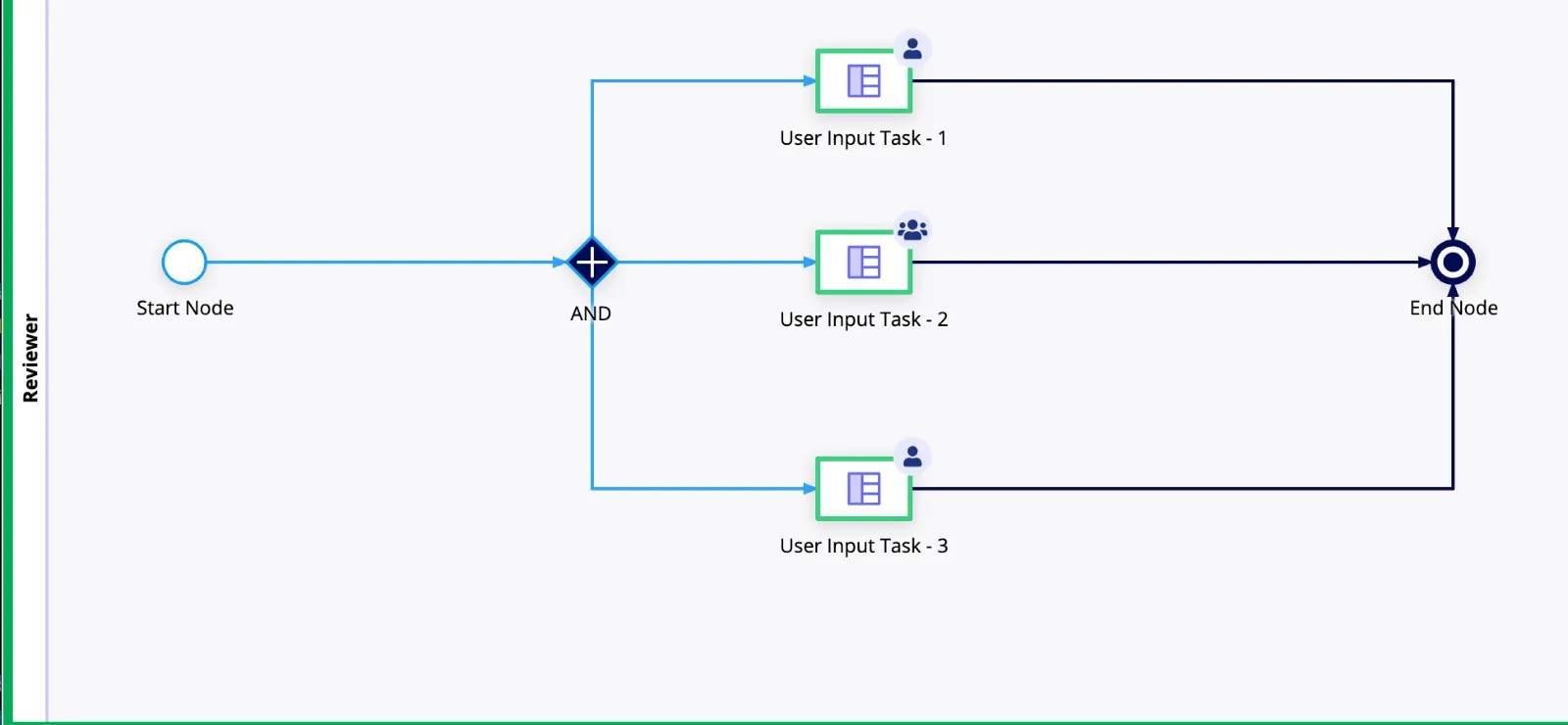
- Add an AND Gateway to split the process into three parallel paths.
- Set up three User Input Tasks, each assigned to a different reviewer.
- Connect each User Input Task to an End Event with a Terminate Process trigger.
- When any reviewer completes their task, that path reaches the Terminate End Event.
- Appian stops the remaining active paths, which cancels the other pending approval tasks.
Example:
Say all three tasks are active:
- Reviewer A → Pending
- Reviewer B → Approved
- Reviewer C → Pending
When Reviewer B completes the task, that path reaches the Terminate End Event. Appian cancels the pending tasks for Reviewers A and C and ends the process instance.
Use this approach only when the whole process should end after the first approval. The same process instance can’t go on to another stage.
Approach 2: Use a synchronous subprocess (recommended)
If the process has to continue after the first approval, I would move the approval steps into their own subprocess.
Implementation:
- Create a subprocess called
Loan Approval. - Inside it, use an AND Gateway to create three parallel approval tasks.
- Assign each User Input Task to a different reviewer.
- Connect the approval tasks to a Terminate Process End Event.
- In the parent process, add a Subprocess node that calls
Loan Approval. - Set the subprocess to run synchronously, so the parent waits for it to finish.
- Capture the first reviewer’s response, and map the approval details back to the parent in the subprocess outputs.
- When the subprocess finishes, the parent process moves to the next stage.
How it works:
Say Reviewer B approves the loan first.
- Reviewer B’s approval is captured.
- The Terminate Process End Event fires inside the approval subprocess.
- The pending tasks for Reviewers A and C are canceled.
- The approval subprocess ends.
- The parent process picks up again and moves to the next stage, such as loan processing or disbursement.
This way only the approval subprocess is terminated, and the main business process keeps running.
Design considerations
Approval vs. task completion
If the process should move on only when someone selects Approve, and not every time a task is completed, capture the decision and use an XOR Gateway to route the next step.
For example, a rejection should follow its own business path. It shouldn’t be treated as an approval just because the task was completed.
Capture approval details
Before the approval subprocess terminates, make sure the reviewer’s decision and details are saved.
For example:
- Approved By: Reviewer B
- Decision: Approved
- Approval Date: current date and time
Concurrent submissions
Two reviewers might submit at almost the same moment. The process should stop that from causing duplicate approvals or running the downstream steps twice. Test this case, and add a single-decision control if you need one.
Activity chaining
Don’t chain activities into the Terminate End Event unless you need to. Check that the pending tasks are canceled correctly and that the parent receives the subprocess outputs it needs.
Conclusion
In an interview, I would explain both approaches:
- Terminate End Event: use it when the whole process should end as soon as one parallel task is completed.
- Synchronous subprocess with a Terminate End Event: use it when the remaining approval tasks need to be canceled but the parent process has to continue to the next stage.