In Appian, what is the difference between a normal End Event and a Terminate End Event? Explain their use with a real-time example and mention best practices for using Terminate End Nodes.
Answer
In Appian, a normal End Event ends one path of a process, while an End Event with the Terminate Process trigger ends the whole process. There is no separate “Terminate End Event” node. Terminate is a trigger you add to an End Event, and the canvas shows a distinct marker on it.
A plain End Event closes only the path that reaches it, and the process stays active until every active path has reached an end event. With the Terminate Process trigger, the process stops all branches, even ones that haven’t reached an End Event yet, and cancels the active nodes still waiting, such as user tasks.
Example: A loan application
Maya applies for a personal loan on your company’s portal. Three checks start at the same time because none of them depends on the others:
- A credit check that runs automatically.
- A document review, where a loan officer checks her pay stubs and ID in a user task.
- A fraud screening that runs automatically.
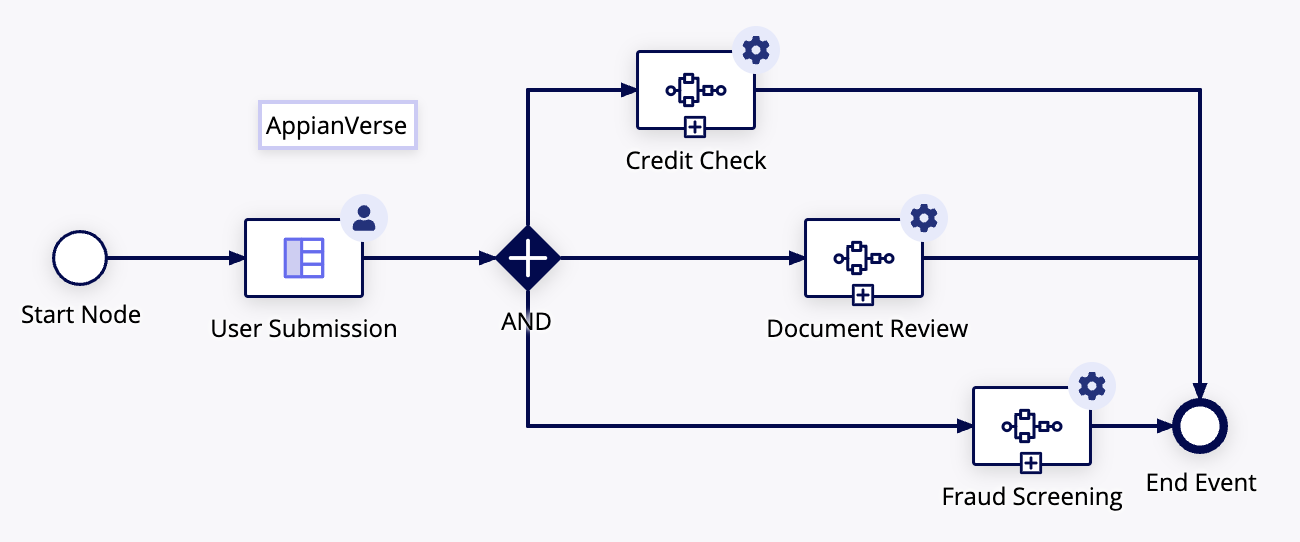
In the above diagram, there are follows and all mapped to End Event
End Event: If run the app , if any process completed first and reach End Event , the process model still waits on other process to completed.
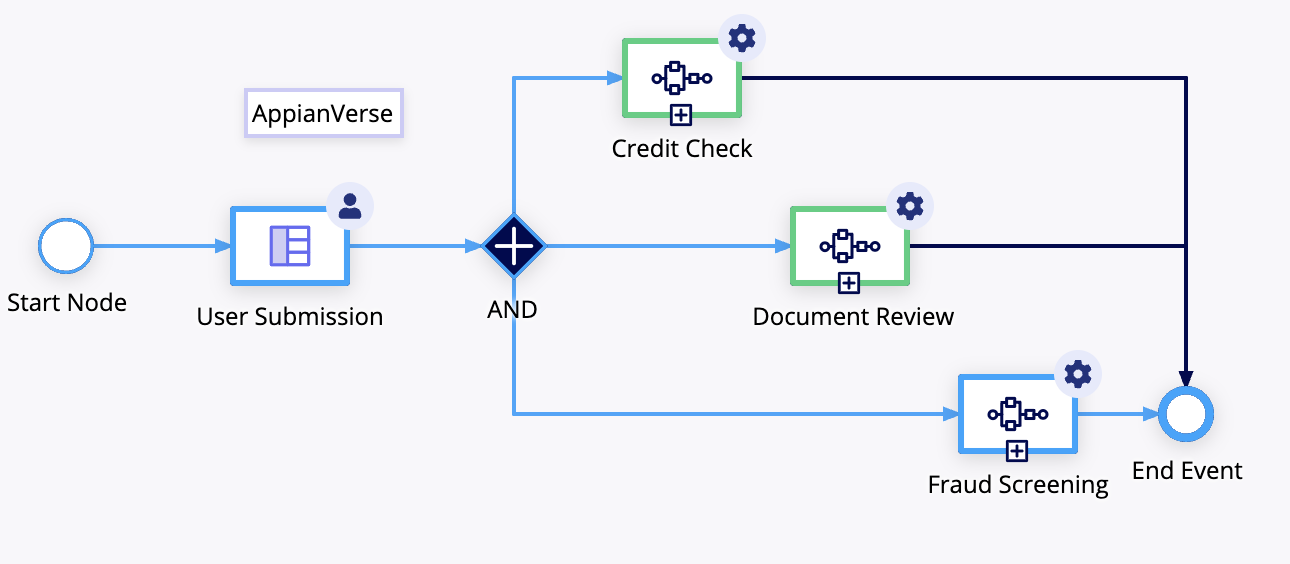
In the above diagram , as we can see the "Fraud Screening" process completed earlier than other process . The process still waiting other process "Credit Check " , "Document Review" to completed. Until the all the tasks completed, the process wil be active
Terminate Event: In the same example if we configured the End Event as Terminate Event , the process immediately terminates other tasks. Suppose the "Fraud Screening" fails we can terminate all the tasks.
Best practices
- Use Terminate only on exception paths such as cancellation or fatal errors. Regular completion should end at normal End Events so each path finishes on its own.
- Do logging, notifications and data cleanup before the Terminate node, or use a Send Message trigger on the node itself. In the example, the “Rejected” status update has to happen first, or the record stays out of date.
- Name and describe each Terminate trigger by its reason, for example “Terminate: Fraud Flagged”. The trigger has a Description field for this, and it makes debugging easier.
- Don’t rely on Terminate to stop subprocesses. An Appian KB article says subprocesses stay active when activity chaining leads into the Terminate node, because the cancellation runs with the privileges of the user who completed the last task. Community reports also say an asynchronous subprocess isn’t cancelled by its parent’s Terminate. If a child process must stop, cancel it explicitly or signal it with a flag or message, and test it in your version.
- Keep Terminate nodes few. Appian allows several, but each one is a hard stop, so each should have a documented purpose.
- The loan scenario and the fraud decision are my own illustration, so check the node names against your Appian version before publishing.
Check yourself
Question 1 of 4, on what the answer above covers.
- 1.A process has three parallel paths. One path reaches a normal End Event while the other two are still running. What happens?
- 2.How do you create a "Terminate End Event" in Appian?
- 3.In the loan example, the fraud screening flags Maya's application and that path reaches the Terminate End Event while the loan officer's review task is still open. What happens to the review task?
- 4.Which best practice applies when you use a Terminate trigger?