You have a process model with a subprocess that is called asynchronously (fire-and-forget) from a parent process. The subprocess writes to a database, and separately, a user is viewing a record-backed interface that reads from the same table. Under high concurrency, users occasionally report seeing stale data even after refreshing. Explain what's likely happening at the Appian engine level, and how you'd diagnose and fix it.
You have a process model with a subprocess that is called asynchronously (fire-and-forget) from a parent process. The subprocess writes to a database, and separately, a user is viewing a record-backed interface that reads from the same table. Under high concurrency, users occasionally report seeing stale data even after refreshing. Explain what's likely happening at the Appian engine level, and how you'd diagnose and fix it.
Answer
The most likely cause is a race condition between the asynchronous subprocess and the record read. A record synchronization or interface refresh problem may be adding to it.
Example: customer order processing
Say an order management app starts an asynchronous subprocess when a customer places an order, to change the status from Pending to Approved. At the same time, a customer service rep has that order open in a record interface.
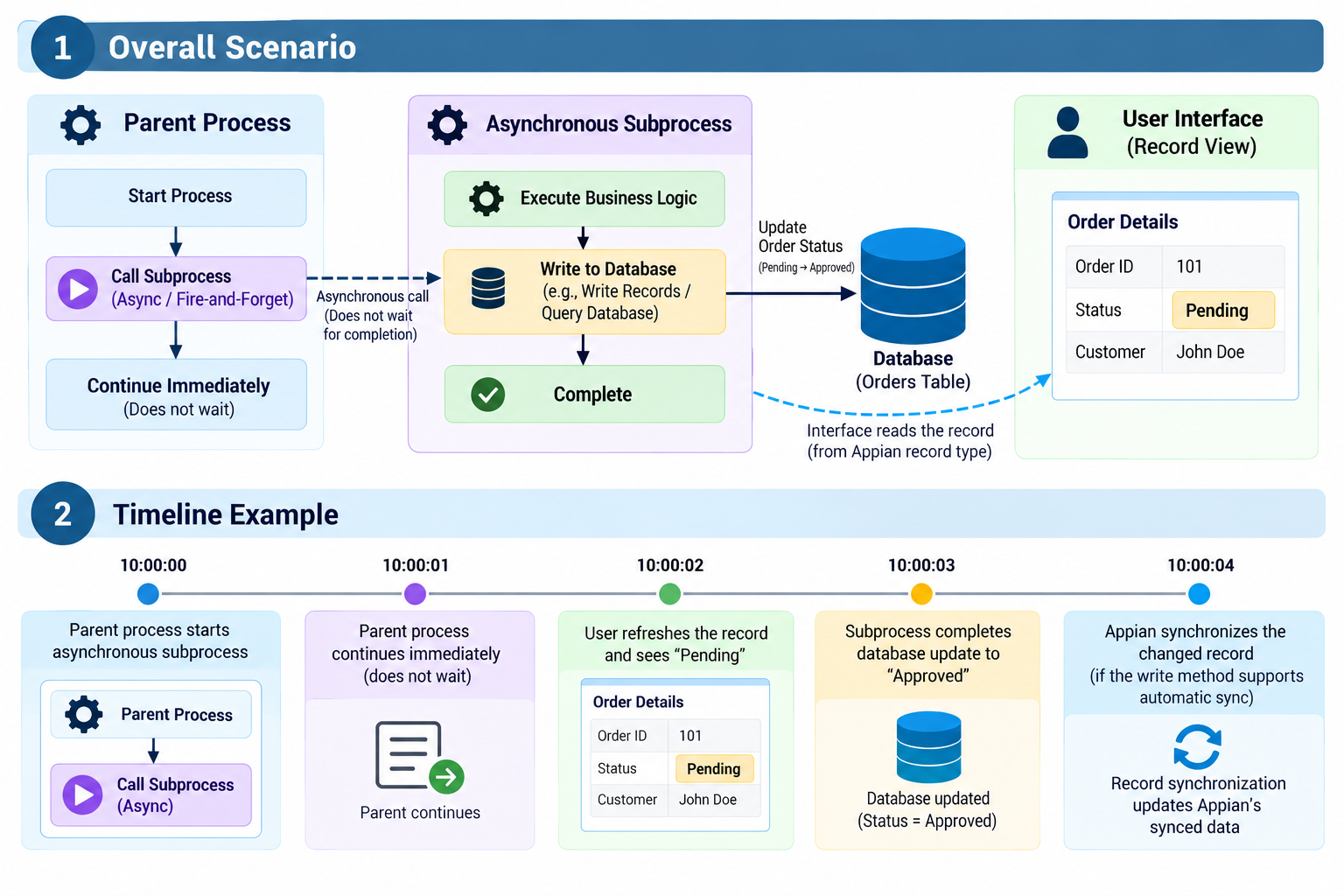
The user sees the old status because the interface read the data before the subprocess finished its update. That’s a race condition: two independent operations happen close together, and the result depends on which one finishes first. The times above are illustrative, and real execution depends on the application.
What happens in Appian
The process engine, the database, and the record data service each do a different job.
A subprocess can run in two ways. A synchronous subprocess makes the parent wait until it finishes. An asynchronous one lets the parent start it and keep going, so the parent finishing says nothing about whether the database update is done. Under high concurrency, many processes run at once and some writes take longer.
The subprocess writes to the database through a smart service such as Write Records, Write to Data Store Entity, or Query Database. The value changes when that write completes successfully. Process execution alone doesn’t guarantee that a separate interface already has the new value.
Record types can access data in two ways:
- Optimized Data Access (synced): Appian keeps a synchronized copy of the source data in its data service to make queries faster.
- Direct Data Access (unsynced): Appian queries the source database directly.
For a synced record type, the interface reads Appian’s copy, not the table. If the database has been updated but the synced record hasn’t, the interface still shows the previous value.
Not all writes sync the same way
This matters most when you’re troubleshooting.
Write method | Automatically syncs eligible synced record types? |
|---|---|
Write Records | Yes |
Write to Data Store Entity | Yes |
Write to Multiple Data Store Entities | Yes |
Query Database (SQL updates) | No |
External application updating the database | Not automatically through an Appian write smart service |
With Write Records, Appian synchronizes the updated data for a synced record type automatically, so don’t assume every Write Records operation has its own scheduled-sync delay. A user can still read the record before the subprocess reaches or finishes the write.
With Query Database, say the subprocess runs:
The database updates, but Query Database does not sync that change to a synced record type. The record can keep showing “Pending” until something else syncs it. In that case, use the Sync Records smart service after the database update to sync the affected record.
Why refreshing doesn’t always help
Refreshing an interface doesn’t necessarily sync the underlying record type with the database. Three separate operations are involved:
- Database update: changes the value stored in the database.
- Record synchronization: updates Appian’s synced record data.
- Interface refresh: re-evaluates the interface or its configured data query.
If the database says “Approved” but the synced record still says “Pending”, refreshing just retrieves “Pending” again.
Even when the record is up to date, an interface can show an old value if it uses a local variable that hasn’t refreshed. a!refreshVariable() controls that behavior. Appian also refreshes rv!record data automatically for certain Write Records actions run from the record view itself. That doesn’t mean an unrelated user’s interface refreshes whenever a background process changes the same record.
How to diagnose it
Work through it step by step before changing the subprocess configuration.
Step 1: Check the subprocess. Open the parent process instance in Process Monitoring and inspect the asynchronous subprocess. Look at whether it started and finished successfully, which write smart service it uses, whether the write node completed or errored, and how long it took. You’re trying to find out whether the interface read the record before the update finished.
Step 2: Check the database. Query the affected row with an authorized database tool:
If it still shows “Pending”, look at the subprocess, failed writes, or competing updates. If it shows “Approved”, move on to the record layer.
Step 3: Check the record type. Find out whether it uses Optimized or Direct Data Access. For a synced record type, query the record directly with a!queryRecordType(), review the Sync History, check whether a sync failed, was skipped, or is still pending, and confirm the write method triggers automatic sync. A failed sync can also make records unavailable. If Appian is set to skip certain failed syncs, previously synced data may stay available instead.
Step 4: Check the interface. If the database and a record query both return the new value, look at how the interface loads its data and whether a local variable is holding an old result. Review a!refreshVariable(), refreshAfter, and any other refresh settings.
Step 5: Test under concurrency. Run controlled tests with several process instances updating records, and compare write completion time, record query results, and what the interface shows. Also check for simultaneous updates to the same row. Sometimes the stale value is really one process overwriting another’s newer value.
How to fix it
The fix depends on the root cause.
Root cause | Recommended solution |
|---|---|
UI reads before the async write finishes | Wait for confirmed completion before showing the final result, or display a processing status |
Query Database updates are not synced | Use Sync Records after the successful database update |
Record sync failure | Investigate Sync History, correct the error, and resynchronize |
Interface holds an old query result | Configure the appropriate refresh behavior |
Multiple processes overwrite each other’s updates | Review concurrency controls, conditional updates, or versioning |
Database replication lag | Investigate the actual database routing and replication configuration, if replicas are used |
Whether to make the subprocess synchronous depends on the business requirement. If the parent must wait for the database update before moving on, synchronous may be right. It won’t make a separate user’s open interface refresh, though. For a background process, a better experience is usually a “Processing” status, with the relevant data refreshed once completion is confirmed.
Switching to Direct Data Access also isn’t always necessary. Appian generally recommends Optimized Data Access for its performance and data fabric features. Direct Data Access fits better when you need immediate access to externally changed source data and syncing isn’t suitable.
Interview takeaway
Find where the outdated value actually lives:
- If the database is stale, look at the asynchronous subprocess and the writes.
- If the database is current but the synced record is stale, look at synchronization.
- If the record is current but the interface is stale, look at interface refresh behavior.
A timing issue from asynchronous execution is the likeliest first explanation, but the exact cause depends on the write method, the record type configuration, and when the interface reads the data. In an interview, don’t blame caching or switch the subprocess to synchronous right away. First work out whether the problem is in process execution, database persistence, record sync, or interface refresh.
Official Appian documentation
Check yourself
Question 1 of 5, on what the answer above covers.
- 1.An asynchronous subprocess runs
UPDATE ORDERS SET STATUS = 'Approved' WHERE ORDER_ID = 101through Query Database. The database shows "Approved", but a synced record interface still shows "Pending". What's the most likely cause and fix? - 2.The database says "Approved" and the synced record still says "Pending". A user refreshes the interface. What do they see?
- 3.Someone suggests making the subprocess synchronous to fix stale data for a user who already has the record open. What's the right response?
- 4.When is switching a record type to Direct Data Access the better choice?
- 5.Which of these write methods automatically syncs eligible synced record types?