You created a new Boolean constant named AV_BOOLEAN_ENABLE_DELETE_TEM_DOCUMENTS in the Development environment and marked it as Environment Specific.
When deploying the application package to the QC environment, the deployment fails with the following error:
The constant [uuid=...] was not created because a value for the constant must be provided in an import customization file when it is environment specific.What causes this error, and how would you resolve it?
You created a new Boolean constant named AV_BOOLEAN_ENABLE_DELETE_TEM_DOCUMENTS in the Development environment and marked it as Environment Specific.
When deploying the application package to the QC environment, the deployment fails with the following error:
What causes this error, and how would you resolve it?
Answer
The constant is marked as environment specific, but the import customization file has no value for it. The first time an environment-specific constant goes to a target environment, Appian needs an initial value. Regular constants take their value from the source environment, but environment-specific ones don’t.
Error:
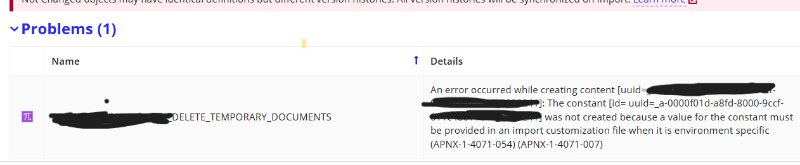
The deployment is failing due to environment constant ,As suggesting in error we need to imported customize file importing the package in QC environment
1. Download the customization file
Download the generated import customization file from the deployment package in Appian.

2. Find the constant
Open the file in a text editor and search for the constant name:
3. Uncomment the property and set a value
Remove the single # at the start of the property line:
TRUE is only an example. Set TRUE or FALSE to match what QC needs.
When you edit the file:
- Leave the generated constant UUID as it is.
- Keep the
##on the instruction and heading lines. - Don’t leave the value empty.
- Make sure the property line doesn’t start with
#.
4. Deploy to QC
- Save the
.propertiesfile. - Upload it with the application package when you deploy to QC.
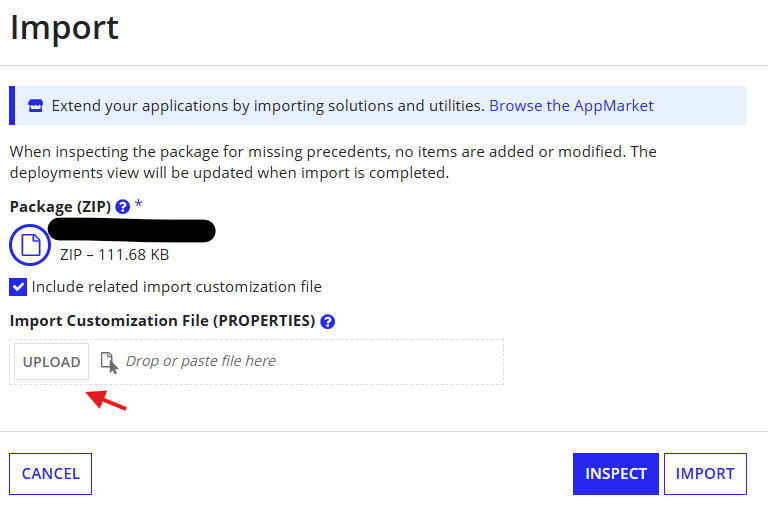
Run the deployment again and check that the constant was created with the right value.
What happens on later deployments
For constants marked as environment specific in the deployment package:
Scenario | Appian behavior |
|---|---|
Constant is new in QC and no value is provided | Deployment fails |
Constant is new in QC and a value is provided | Constant is created |
Constant already exists in QC and no value is provided | Existing value is kept |
Constant already exists in QC and a new value is provided | Existing value is updated |
So once the constant exists in QC, you only need to include a value when you want to change it.
Interview tip
Mark a constant as environment specific when its value has to differ between environments. For example:
- DEV:
AV_ENABLE_EMAIL_NOTIFICATION = FALSE - QC:
AV_ENABLE_EMAIL_NOTIFICATION = FALSE - PROD:
AV_ENABLE_EMAIL_NOTIFICATION = TRUE
Email notifications stay off in the test environments and on in Production.
Check yourself
Question 1 of 3, on what the answer above covers.
- 1.Question: You created a new environment-specific constant CONS_ENABLE_EMAIL in DEV. While deploying it to QC for the first time, Appian throws an error stating that a value must be provided.What should you do to resolve this error?
- 2.An environment-specific constant CONS_API_URL already exists in QC with the value https://qc.example.com.A developer updates the constant's description in DEV and deploys it to QC without providing a value in the customization file.What happens to the constant's value in QC?
- 3.You are deploying a new environment-specific Boolean constant to QC. Your import customization file contains:
#content.CONSTANT_UUID.VALUE=TRUEYou upload the file, but Appian still reports that a value must be provided.What is the most likely reason?