What is an Environment-Specific Constant in Appian?
What is an Environment-Specific Constant in Appian?
Answer
Environment-Specific Constants in Appian are regular Constant design objects set up to hold values that differ by environment — Development (Dev), Quality Assurance (QA), and Production (Prod). They exist to preserve those per-environment values during deployments so a value from one environment doesn’t overwrite another.
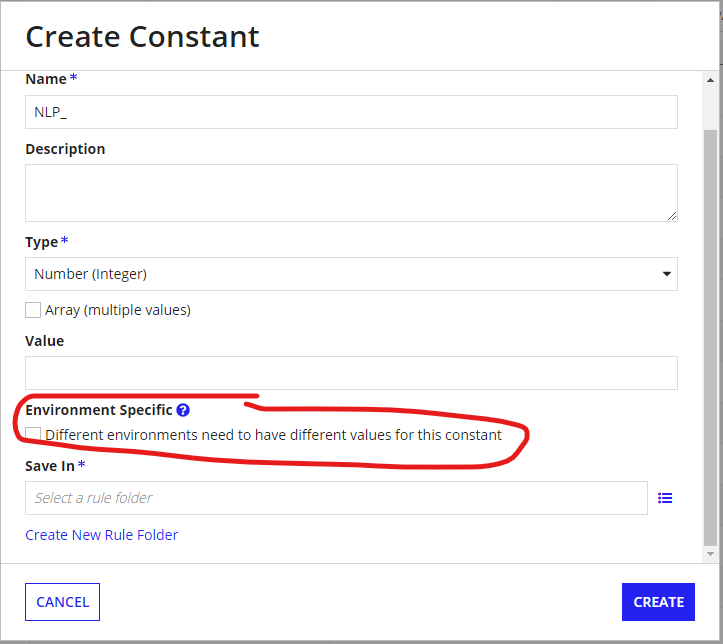
When you enable the Environment Specific checkbox, the constant’s value is left out of the exported object definition. During deployment, Appian keeps the existing value in the target environment unless you supply a new one through an Import Customization File (ICF).
Example
Say an Appian application integrates with a legacy ERP system over REST APIs, and each environment has a different API endpoint. Rather than create separate constants or update endpoints by hand after every deployment, you configure one environment-specific constant, CONS_ERP_BASE_URL
Environment | Constant Value |
|---|---|
Development | |
QA | |
Production |
How it works in practice:
- Create the constant: In Development, create
CONS_ERP_BASE_URLwith data type Text and enable the Environment Specific checkbox. - Prepare the deployment: When deploying to QA, download the generated Import Customization File (
.properties). - Configure the target value: Find the constant’s property in the file, uncomment it, and replace the Development endpoint with the QA endpoint.
- Import the application: Upload the configured ICF with the deployment package. Appian assigns the QA endpoint to the constant.
- Future deployments: Appian keeps the existing QA value unless the ICF supplies a replacement.
The first deployment to a new environment needs an ICF, because the constant has no value there yet.
An ICF entry looks like this:
The identifier is illustrative. Use the exact property Appian generates for your constant instead of building it by hand.
Things to know:
- Supported data types: Only primitive types (Text, Integer, Boolean, and so on) and Email Address.
- Unsupported types: Complex types and object references such as Groups, Documents, and Process Models.
- Import behavior: If the constant already exists in the target, its value stays unchanged unless the ICF updates it.
- Naming convention: A consistent prefix like
ENV_, or[ES]in the description, makes these constants easier to spot. - Deployment best practice: Keep a separate ICF per environment and check the values before deploying. Don’t store sensitive credentials in constants when a secure credential option is available.
Without this, deploying from Development to Production could leave the Production app pointing at a Dev or QA endpoint — causing integration failures, wrong data processing, or data sent to the wrong system. Environment-specific constants keep environment-dependent values out of the deployment package and prevent that.
Check yourself
Question 1 of 3, on what the answer above covers.
- 1.You are deploying an Appian application from Dev to Production for the first time. The application contains an environment-specific constant CONS_ERP_BASE_URL. How should you configure the Production API endpoint?
- 2.An Appian application has an environment-specific constant CONS_PAYMENT_API_URL.The constant is already configured in QA with the correct QA endpoint. A developer deploys an updated application package from Development without providing a replacement value for this constant.What happens to the constant's value in QA?
- 3.Your team is configuring environment-specific constants for an Appian application.Which of the following can be configured as environment-specific constants?Select all that apply.
Select all that apply