Question
How can you validate and restrict file extensions across an entire Appian application?
How can you validate and restrict file extensions across an entire Appian application?
A
Anonymous
December 17, 2025
88
Answer
You can set file extension rules once in the Admin Console. Every File Upload component in the environment then follows them, so you don’t have to repeat the same validation on each one.
1. Configure the file upload settings
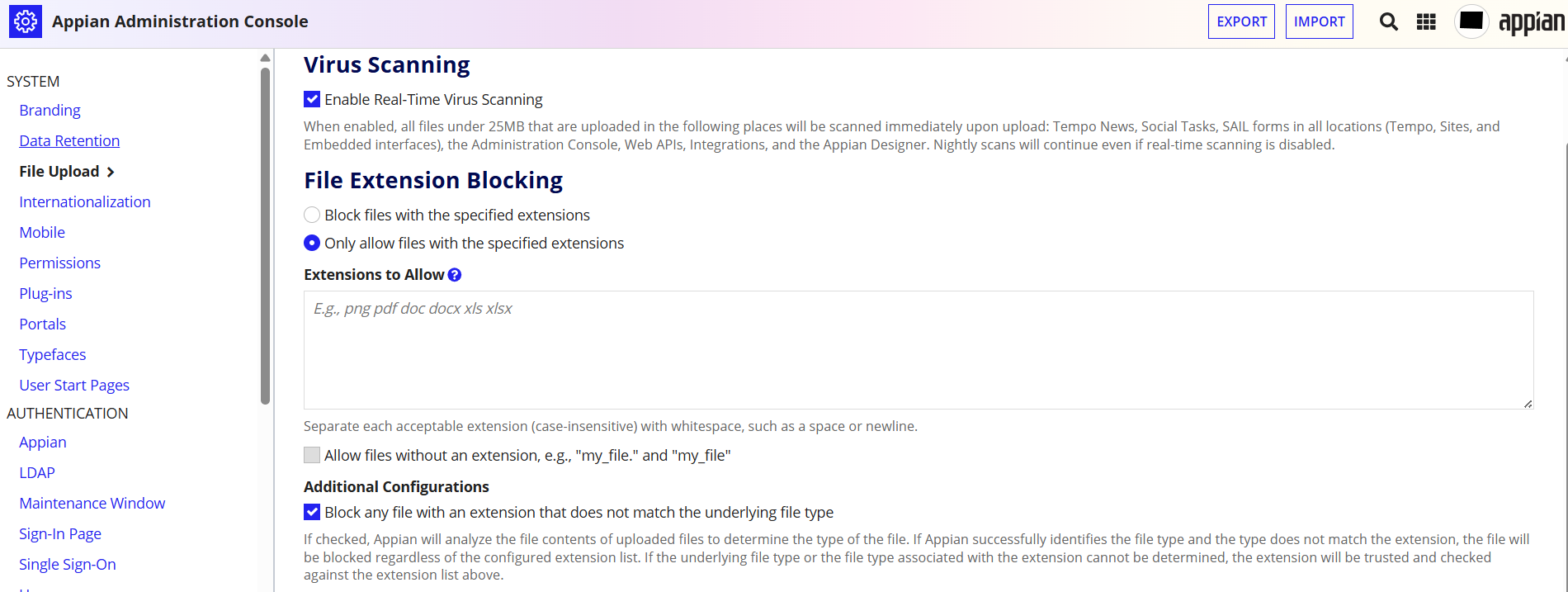
- In the Admin Console, go to System > File Upload.
- Under the file extension restrictions, pick one mode:
- “Only allow files with the specified extensions,” then list the extensions you permit, such as
pdf,docx,jpgandpng. - “Block files with the specified extensions,” then list the ones to reject.
- Turn on “Block any file with an extension that does not match the underlying file type.”
- Save.
An allowlist combined with file type verification is the stronger setup.
2. How file type verification works
With verification on, Appian checks the file’s contents as well as its extension. For example, suppose your application accepts only PDF and Word documents:
invoice.pdf, a real PDF, is allowed.report.exeis blocked becauseexeisn’t on the allowlist.malicious.pdf, a recognized executable renamed to.pdf, is blocked because its contents don’t match the extension.
When Appian can’t identify a file’s underlying type, it falls back to the extension rules.
3. Limits to know
- The settings cover every application in the Appian environment. You can’t scope them to one application.
- They only apply to files uploaded through the File Upload component. Other ways of getting documents into Appian aren’t covered.
- The extension restrictions don’t apply to System Administrators.
- If one form needs different extensions from another, add a check in the
validationsparameter ofa!fileUploadField()usingfv!files.extension.
Check yourself
Question 1 of 3, on what the answer above covers.
- 1.Your Appian application contains 20 different forms with file upload components. The security team wants to allow only PDF, DOCX, JPG, and PNG files across all applications in the same environment, without modifying every interface. What is the best approach?
- 2.An application allows PDF uploads. A user renames a file whose actual contents are recognized as a different file type to report.pdf and attempts to upload it. Which Appian configuration can detect and block this mismatch?
- 3.An Appian environment permits PDF, JPG, and PNG uploads. However, the Invoice Submission form must accept only PDF files, while the Profile Picture form should accept only JPG and PNG. What is the best approach?
JuniorSeniorAdmin Console