How can you integrate an external Oracle database or any database with Appian Cloud?
How can you integrate an external Oracle database or any database with Appian Cloud?
Answer
Appian Cloud connects to external relational databases such as Oracle over JDBC. You can set the connection up in two ways.
Method 1: Admin Console
- Log in to Appian Cloud as a system administrator.
- Go to Admin Console → Integration → Data Sources.
- Click New Data Source.
- Enter the connection details:
- Name:
jdbc/OracleDB - Type: Oracle
- Connection string: the Oracle JDBC URL
- Username and password for the database account
- Click Test Connection to check that Appian can reach the database, then click Save.

Once it’s saved, you can use the database through record types, data stores, and the Query Database smart service.
Method 2: Data Source connected system (recommended)
- In Appian Designer, select New → Connected System.
- Choose Oracle Data Source, or another supported database.
- Enter the JDBC connection URL and the authentication credentials.
- Create the connected system and use it in your application.
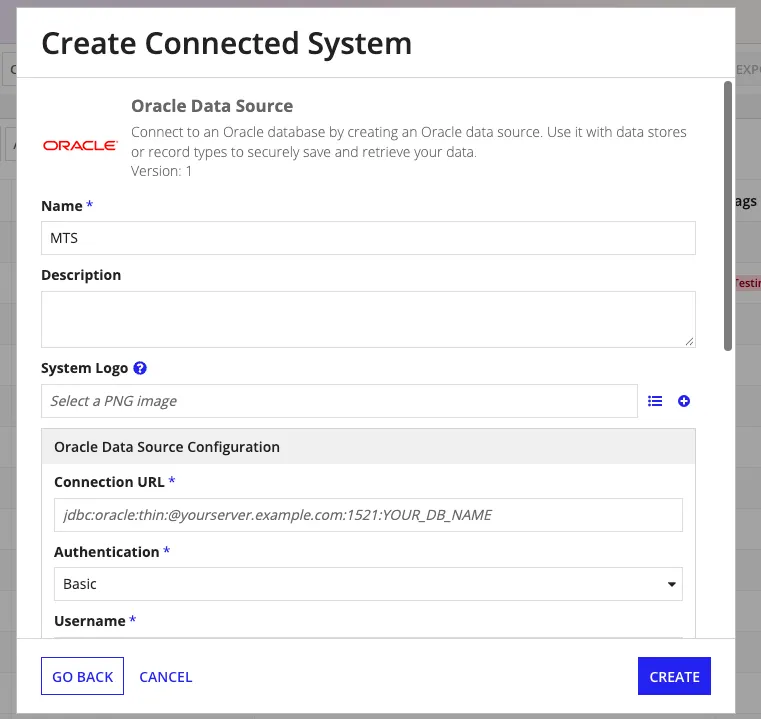
This is the better option for a few reasons. It deploys across Dev, Test, and Production. It supports object-level security. It keeps the database connection settings in one place, and it lets you set connection pool limits.
Supported databases
Appian has built-in JDBC support for Oracle, Microsoft SQL Server, MySQL, PostgreSQL, MariaDB, IBM DB2, and Amazon Aurora (MySQL and PostgreSQL). Any other JDBC-compatible database can go through a Custom JDBC connected system, though functionality may differ from the supported ones.
Things to check
- Network: Appian Cloud has to be able to reach the database. A database on a private network may need a VPN or another supported private connection.
- Security: Use TLS/SSL and set firewall rules appropriately.
- Drivers: Appian Cloud ships with drivers for its supported databases, so you usually don’t need to install anything.
Interview tip: Getting the JDBC URL, username, and password right is only part of it. The database also has to be reachable from Appian Cloud, and the connecting user needs the right database permissions.
References: Appian: Data Sources · Appian: Data Source Connected Systems
Check yourself
Question 1 of 3, on what the answer above covers.
- 1.Your Appian application connects to an external Oracle database. The same application must be deployed across Development, Test, and Production, each with different database connection details. Which approach is most suitable?
- 2.You configured an external Oracle database in Appian Cloud with a valid JDBC URL, username, and password. However, Test Connection fails with a network timeout. The Oracle database is hosted inside your company's private network. What should you investigate first?
- 3.An external Oracle database is successfully connected to Appian Cloud, and Test Connection passes. However, an Appian Record Type fails to read data from the CUSTOMER table with an Oracle 'insufficient privileges' error. What is the most appropriate solution?