What is a JOIN in SQL? List and explain the types of JOINs used in SQL with examples
Answer
A JOIN combines rows from two or more tables using a column they share. For example, a company might keep employee details in one table and departments in another. Each employee row holds only a department ID, and a JOIN brings in the department name when you query.
Types of JOIN
JOIN type | What it returns |
|---|---|
INNER JOIN | Only rows that match in both tables |
LEFT JOIN | All rows from the left table, plus matching rows from the right |
RIGHT JOIN | All rows from the right table, plus matching rows from the left |
FULL OUTER JOIN | All rows from both tables, matched or not |
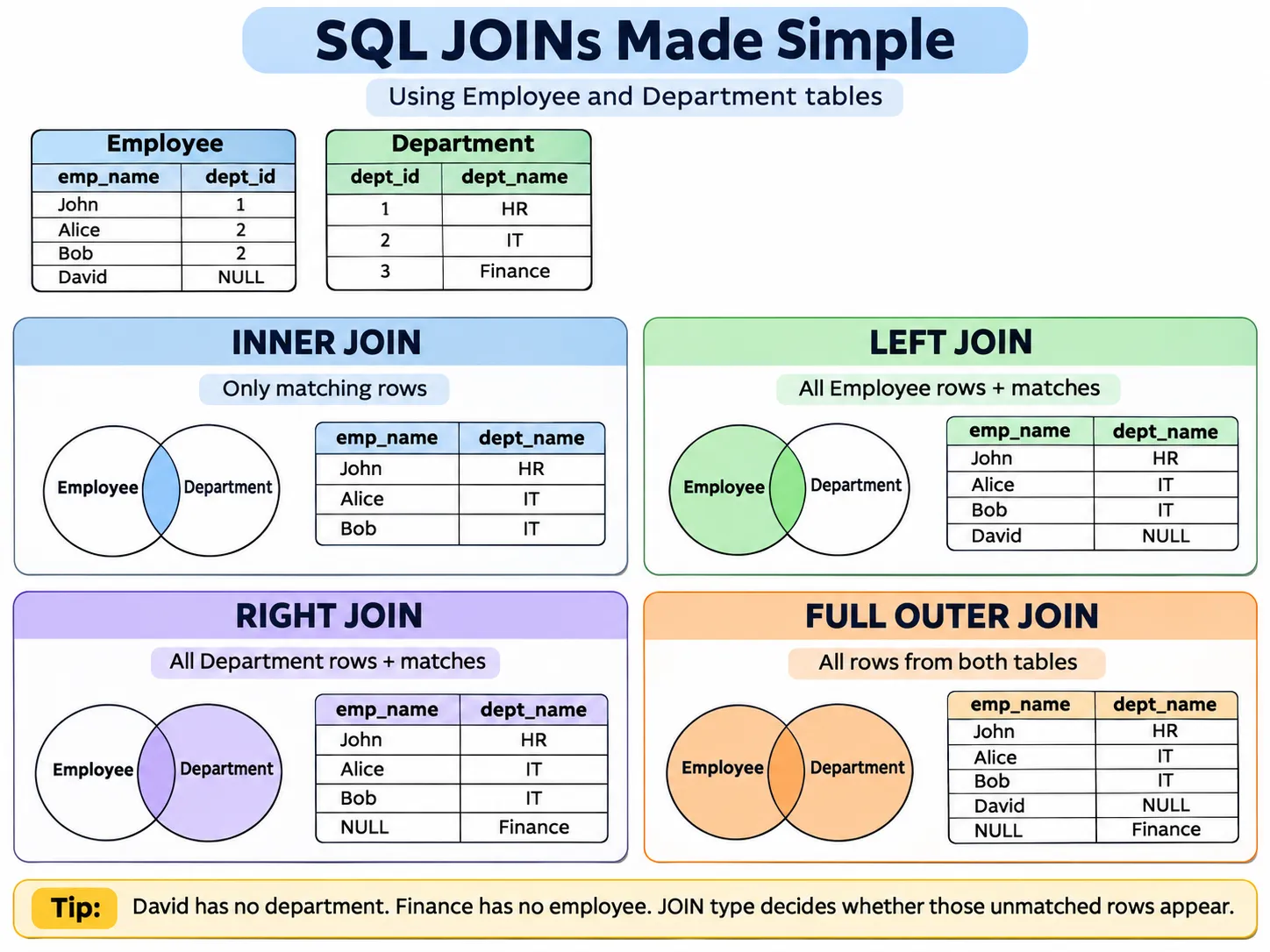
Tables
Employee
emp_id | emp_name | dept_id |
|---|---|---|
1 | John | 1 |
2 | Alice | 2 |
3 | Bob | 2 |
4 | David | NULL |
Department
dept_id | dept_name |
|---|---|
1 | HR |
2 | IT |
3 | Finance |
John is in HR, and Alice and Bob are in IT. David has no department, and Finance has no employees. These two unmatched rows are what make each JOIN return something different.
1. INNER JOIN
An INNER JOIN returns only rows with matching values in both tables.
Output:
emp_name | dept_name |
|---|---|
John | HR |
Alice | IT |
Bob | IT |
David drops out because his dept_id is NULL, and Finance drops out because no employee belongs to it.
Use it to list employees with their departments when unassigned employees should be left out.
2. LEFT JOIN (LEFT OUTER JOIN)
A LEFT JOIN returns every row from the left table, even when the right table has no match. The right table’s columns come back as NULL for those rows.
Ouput:
emp_name | dept_name |
|---|---|
John | HR |
Alice | IT |
Bob | IT |
David | NULL |
All four employees come back. David’s department name is NULL because no department matches.
Use it to list every employee, including people not yet assigned to a department.
Finding employees without a department Add a WHERE ... IS NULL filter to keep only the unmatched rows:
Output: David
This pattern finds missing relationships and incomplete assignments.
3. RIGHT JOIN (RIGHT OUTER JOIN)
A RIGHT JOIN returns every row from the right table, even when the left table has no match.
Output:
emp_name | dept_name |
|---|---|
John | HR |
Alice | IT |
Bob | IT |
NULL | Finance |
Every department appears. Finance shows up with a NULL employee name because no one works there.
Use it for a department report that includes departments with zero employees.
You can usually rewrite a RIGHT JOIN as a LEFT JOIN by swapping the table order. Sticking to LEFT JOIN tends to make queries easier to read.
4. FULL OUTER JOIN
A FULL OUTER JOIN returns every row from both tables, with NULL wherever there’s no match.
Output:
emp_name | dept_name |
|---|---|
John | HR |
Alice | IT |
Bob | IT |
David | NULL |
NULL | Finance |
The three matched employees come back with their departments. David appears without a department, and Finance appears without employees.
Use it for a report that shows unassigned employees and empty departments together.
Database support
SQL Server and PostgreSQL support FULL OUTER JOIN. SQLite supports RIGHT JOIN and FULL OUTER JOIN from version 3.39.0. MySQL has no FULL OUTER JOIN, but you can get the same result with a LEFT JOIN and UNION ALL:
Common JOIN mistakes
- Using INNER JOIN when you need unmatched rows. It drops employees without a department, so use LEFT JOIN if every employee must appear.
- Filtering the right table in WHERE instead of ON. With a LEFT JOIN, a WHERE condition on the right table can remove the unmatched rows you meant to keep.
- Missing duplicate rows. If one row matches several rows in the other table, the JOIN returns one row per match.
- Expecting NULLs to match. With a standard equality condition (
=), NULL never equals NULL. - Relying on row order. SQL doesn’t guarantee any order without ORDER BY.
Interview question
You have 100 employees and 10 departments. Some employees have no department, and some departments have no employees. Which JOIN would you use?
It depends on which rows you need to keep:
- Only employees with a valid department: INNER JOIN.
- All employees, including unassigned ones: LEFT JOIN.
- All departments, including empty ones: RIGHT JOIN with Employee on the left, or a LEFT JOIN with the tables swapped.
- Every employee and every department, matched or not: FULL OUTER JOIN.
Run the SQL yourself
These are the tables from the answer. Write a query, or load one of the examples, and run it.
Running…
Running…
Runs in your browser on a fresh copy of the tables each time, so nothing you change is kept. The engine is SQLite: FULL OUTER JOIN runs here, though MySQL and MariaDB (Appian Cloud) do not have it.