What is decision object in Appian and how it is used?
Answer
In Appian, a Decision Object implements business rules as a decision table. It evaluates several conditions and returns the matching result from predefined rules.
Each column is an input or an output, and each row is a rule. When the inputs satisfy a row’s conditions, the decision returns that row’s output. Complex logic stays readable and easy to change, without long conditional expressions.
Example: Route a loan application for approval
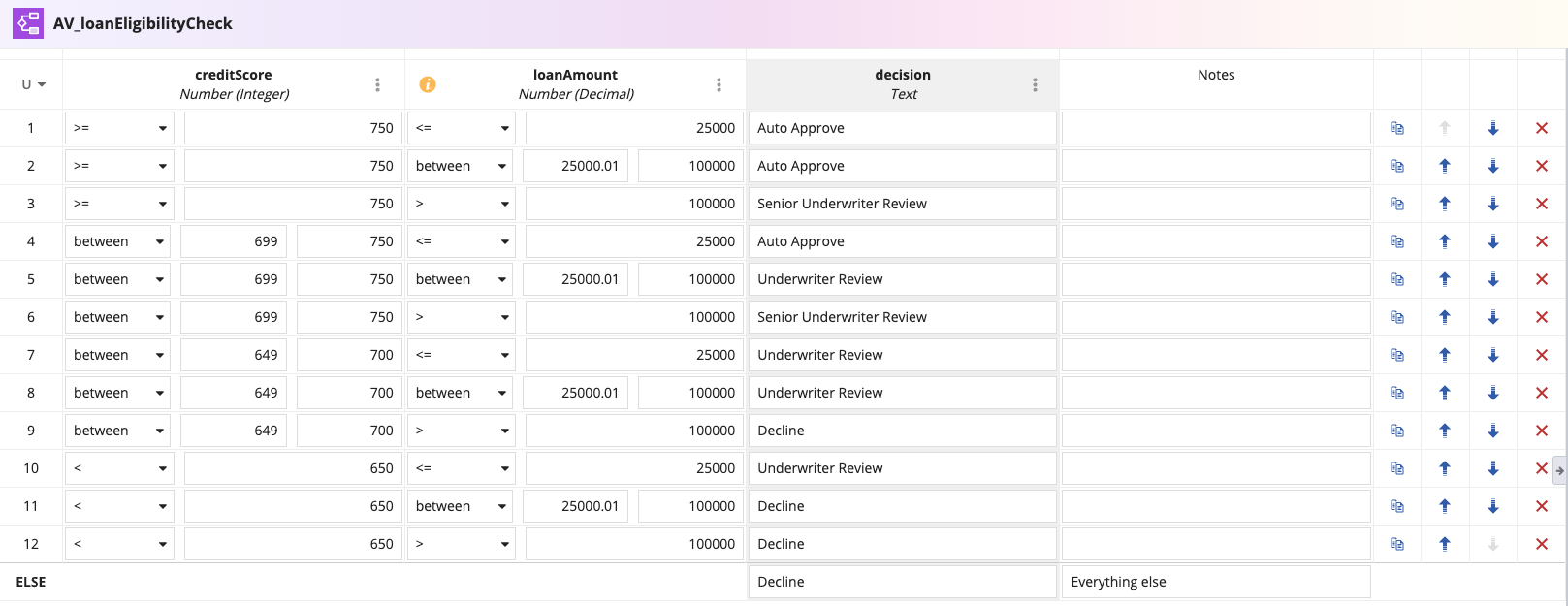
Business Requirement : A lender decides how to handle each application based on the applicant’s credit score and the loan amount. The output is the approval route.
Input: Credit score | Input: Loan amount | Output: Approval route |
|---|---|---|
750 and above | Up to $25,000 | Auto-approve |
750 and above | $25,001 to $100,000 | Auto-approve |
750 and above | Over $100,000 | Senior underwriter review |
700 to 749 | Up to $25,000 | Auto-approve |
700 to 749 | $25,001 to $100,000 | Underwriter review |
700 to 749 | Over $100,000 | Senior underwriter review |
650 to 699 | Up to $25,000 | Underwriter review |
650 to 699 | $25,001 to $100,000 | Underwriter review |
650 to 699 | Over $100,000 | Decline |
Under 650 | Up to $25,000 | Underwriter review |
Under 650 | $25,001 to $100,000 | Decline |
Under 650 | Over $100,000 | Decline |
In Appian, we can a decision object for this example . By clicking New -> Decision Object , and create a new decision object as shown in the below image
A process model or interface or expression can call the decision object with the two inputs and gets the route back:
For following inputs and outputs will be
Output : "Auto Approve"
Output : "Underwriter Review"
When credit policy changes, say auto-approval now starts at a 720 score, an analyst edits one row in the table. No process model or interface has to change.
Decision Object vs. if() vs. a!match()
The same routing could be written without a Decision Object, using if() or a!match(). All three implement conditional logic in Appian, but they suit different jobs.
if() returns one value when a condition is true and another when it is false. That is enough when the rule has a single yes/no test, such as whether a loan is within the fast-track
This returns "Fast track" for loans up to $25,000 and "Full review" otherwise.
a!match() compares one value against several possible cases and returns the corresponding result. It fits when the answer depends on a single value, such as which team handles a loan type:
This evaluates the loan type and returns the team that handles it, or "General Queue" if no case matches. It suits any rule driven by one value, such as status values, categories, or country codes.
The approval route is different because it depends on credit score and loan amount together. Nested if() statements for every combination get hard to read, and a!match() compares only one value. A Decision Object fits because the combinations live in one table that analysts and developers can review and maintain.
Simply for if you have multiple inputs and based on the multiple input combinations the output should be evaluated go for decision object.
Check yourself
Question 1 of 3, on what the answer above covers.
- 1.In a Decision Object, what happens when the inputs satisfy a row's conditions?
- 2.An applicant has a credit score of 720 and requests a $50,000 loan. Using the decision table from the example, what is the approval route?
- 3.Why is a Decision Object a better fit than if() or a!match() for the loan approval route?