Identify and print the capital, small, integers and symbols from the given string in Appian .
For example if the given string is "AdhGy123@"
Output:
{ "A is cap", "d is Small", "h is Small", "G is cap", "y is Small", "1 is number", "2 is number", "3 is number", "@ is symbol" }
Identify and print the capital, small, integers and symbols from the given string in Appian .
For example if the given string is "AdhGy123@"
Output:
Answer
In Appian, you can classify the characters of a string in two ways: by comparing ASCII values or by matching Regular Expressions (regex). Both approaches label each character as a number, a lowercase letter, an uppercase letter, or a special symbol.
Solution 1 :
The first approach uses the code() function to get each character’s numeric code and compares it against fixed ranges.
Code:
Explanation:
This above code labels each character in a string as a digit, a lowercase letter, an uppercase letter, or a special symbol.
1. Convert the string into character codes
code() converts each character in the string into its numeric character code. Uppercase letters run from 65 to 90, lowercase letters from 97 to 122, and digits from 48 to 57. a!forEach() then loops over these numbers and classifies each one.
2. Identify numbers
This condition is true when the code falls between 48 and 57, the range for the digits 0 to 9. The expression then labels the character as a number. Don’t compare against 0 to 9 here, because code() returns character codes, not the digit values.
3. Identify lowercase letters
This condition is true when the code falls between 97 and 122, the range for a to z. char(fv!item) converts the code back into its character, and the expression appends " is Small".
4. Identify uppercase letters
This condition is true when the code falls between 65 and 90, the range for A to Z. The expression converts the code back into a character and appends " is cap".
5. Identify special symbols
If none of the earlier conditions match, the expression labels the character a symbol. For example, @ has the code 64, which is outside every range above, so the result is "@ is symbol".
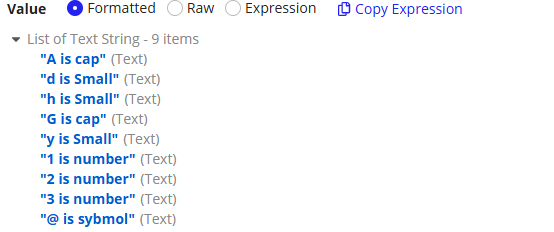
Result:
{"A is cap", "d is Small", "h is Small", "G is cap", "y is Small", "1 is number", "2 is number", "3 is number", "@ is symbol"}
Solution 2: (Using regexmatch() function)
The second tests each character against a regex pattern, which is easier to read.
The regexmatch() function used here isn’t built into Appian. It comes from the Regular Expression Functions plug-in from Appian Corporation, available on AppMarket, so the plug-in must be installed in your environment. The function takes a pattern, the text to search, and an optional set of regex flags, and it returns true or false.
Code:
A quick regex primer
A regular expression is a pattern that describes the text you want to match. This solution uses five pieces:
Piece | Meaning |
|---|---|
| Any one character from |
| Any one lowercase letter |
| Any one uppercase letter |
| The start of the text |
| The end of the text |
Square brackets from a character class, which matches any one character in the range. The ^ and $ anchors require the whole text to be that single character. Each item we test is one character, so the anchors keep the check strict.
Step-by-step explanation
1. Define the input
This is the string to classify.
2. Split the string into single characters
len(local!text)returns the length of the string, which is 9.enumerate(9)returns{0, 1, 2, ..., 8}, and adding 1 gives the positions{1, 2, ..., 9}.mid(text, position, 1)returns one character at each position.
The result is {"A", "d", "h", "G", "y", "1", "2", "3", "@"}.
3. Loop over the characters
a!forEach() runs the expression once per character, and fv!item is the character being checked.
4. Test each character with regex
The nested if() checks the patterns in order:
^[0-9]$matches a digit, so the result is" is number".- If not,
^[a-z]$matches a lowercase letter, so the result is" is Small". - If not,
^[A-Z]$matches an uppercase letter, so the result is" is cap". - If none match, the result is
" is symbol".
Each result is joined to the character with &, for example fv!item & " is cap".
Walking through the example:
A dash means the check never ran, because an earlier check already matched.
Character | Digit? | Lowercase? | Uppercase? | Result |
|---|---|---|---|---|
A | No | No | Yes | A is cap |
d | No | Yes | - | d is Small |
h | No | Yes | - | h is Small |
G | No | No | Yes | G is cap |
y | No | Yes | - | y is Small |
1 | Yes | - | - | 1 is number |
2 | Yes | - | - | 2 is number |
3 | Yes | - | - | 3 is number |
@ | No | No | No | @ is symbol |
Result:
Try it yourself
Change the inputs or the expression and run it to see what it returns.
Independent evaluator: it approximates the Appian expression language and may differ from a real Appian environment. Verify anything that matters. Terms