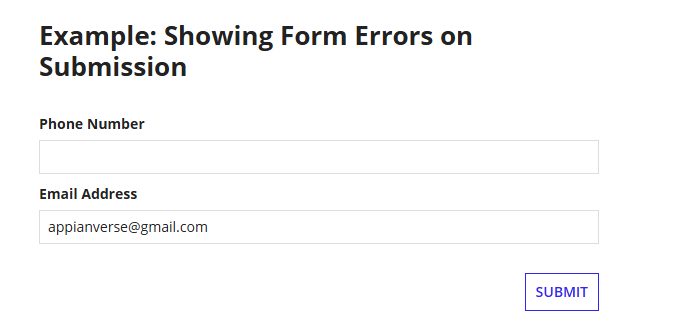
Imagine you have a form with two optional fields. The requirement is that the user must fill out at least one of them, and the error message should only appear after the user clicks Submit. How would you implement this behavior in Appian?
Imagine you have a form with two optional fields. The requirement is that the user must fill out at least one of them, and the error message should only appear after the user clicks Submit. How would you implement this behavior in Appian?
Answer
The error should appear only when they click Submit with both empty, and it should disappear once they enter either value. a!validationMessage() with validateAfter: "SUBMIT", placed in the form-level validations parameter, does exactly this.
Appian Interface Code
How the validation works
1. Initialize the local variables
These variables hold what the user enters in each field. Both start as null because nothing has been entered yet.
2. Capture user input
value displays the field’s current value, and saveInto updates the local variable when the user enters or changes it. The Email Address field works the same way with local!email.
3. Check whether both fields are empty
and() returns true only when both fields are null. If either field has a value, it returns false.
4. Create the validation message
a!validationMessage() creates a form-level message. With validateAfter: "SUBMIT", the message appears only after the user tries to submit, not while they are still typing.
5. Return an empty list when the form is valid
When both fields are empty, if() returns the validation message. When at least one has a value, it returns {}, so the form has no message to show. Because the expression is re-evaluated as the user types, the message goes away as soon as either field is filled in.
Expected behavior
Phone Number | Email Address | Expected result |
|---|---|---|
Empty | Empty | Show the validation message after Submit |
Entered | Empty | No validation message |
Empty | Entered | No validation message |
Entered | Entered | No validation message |
If the user clicks Submit with both fields empty, local!phone and local!email are null, the condition is true, and Appian shows “You must enter either a phone number or an email address!” The form stays open so the user can fix it.
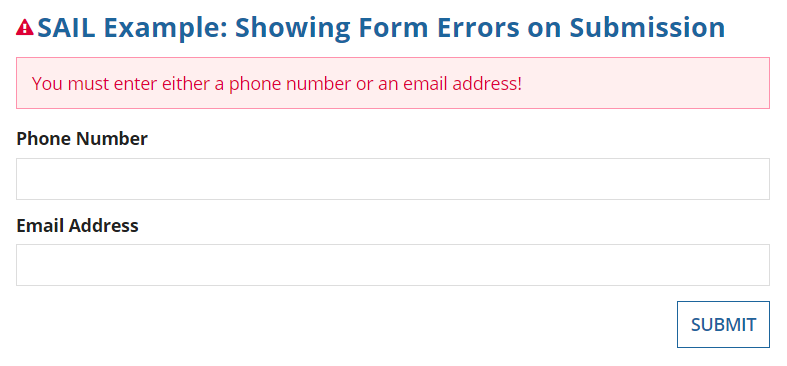
Once the user enters a phone number or an email address, that variable is no longer null. The condition becomes false, the expression returns an empty list, and the message disappears. The form can then be submitted, provided any other validations pass.