How do you deploy a plugin and manage plugin updates in Appian?
How do you deploy a plugin and manage plugin updates in Appian?
Answer
Plugins add features Appian doesn’t have out of the box, such as custom functions, smart services, and connected systems. A system administrator deploys and updates them from the Appian Administration Console.
1. How to deploy a plugin
In Appian Cloud, you can deploy a plugin in two ways.
Method 1: Deploy a plugin from AppMarket
- Log in to Appian and open the Admin Console.
- Go to System → Plug-ins.
- Click Add New Plug-ins.
- Select Appian AppMarket Plug-ins.
- Find a plugin that supports your Appian Cloud version.
- Select it and click Deploy.
- Check that the plugin appears in the list of installed plugins.
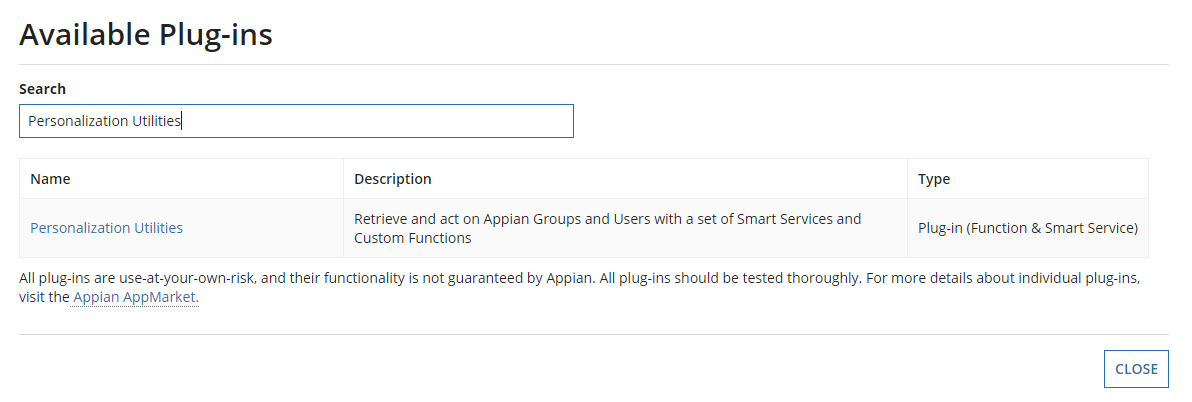
Method 2: Upload a plugin JAR
- Get the approved plugin JAR file.
- Go to Admin Console → System → Plug-ins.
- Click Add New Plug-ins → Direct Upload.
- Upload the JAR file.
- Click Deploy.
- Check the plugin version and confirm its functions or smart services are available.
In Appian Cloud, direct uploads have to follow Appian’s Cloud Deployment Guidelines, so only upload plugins approved for your environment.
2. How to manage plugin updates
When a new plugin version comes out, I update it in steps so existing applications don’t break.
- Check the version. In Admin Console → System → Plug-ins, look at the installed version and its version status.
- Check dependencies. Find the application objects that use the plugin, such as expression rules and process models.
- Read the release notes. Look for compatibility changes, bug fixes, security fixes, and anything that could break existing code.
- Test the update. Update the plugin in a non-production environment first and run regression tests.
- Deploy to production. Once testing passes and the change is approved, update production during the agreed change window.
- Monitor and roll back if needed. Watch how the application behaves and check for errors. Appian lets you revert an AppMarket plugin within three months of updating it, but only to the version that was installed just before the update. Revert covers AppMarket plugins only, so before replacing a plugin you uploaded as a JAR, keep the old JAR in case you need to upload it again.
3. Real-world example
Say an application uses a PDF generation plugin to create reports. It’s on version 1.2, and version 1.3 comes out with bug fixes.
First, I check that the expression rules and process models that generate PDFs will still work with 1.3. Then I update the plugin in the development or test environment and confirm the PDFs still come out correctly. After regression testing passes and the change is approved, I update production. If something goes wrong after that, I assess the impact and revert to 1.2 if rollback is available.
Deploying an application package doesn’t automatically deploy the plugins it uses. Deploy plugins separately, or add the plugin changes to your deployment explicitly.
4. Appian Cloud vs. self-managed environments
Appian Cloud | Self-managed Appian |
|---|---|
Deploy through the Admin Console. | Deploy through the Admin Console or a supported server-side method. |
Direct uploads must follow the Cloud Deployment Guidelines. | Administrators manage plugin files on the Appian servers. |
Appian shows the AppMarket version status. | Administrators track plugin versions and deployments themselves. |
5. Official Appian documentation
- Plug-ins (Admin Console): deploying, updating, reverting and deleting plugins.
- AppMarket Submission Policies for Plug-ins: the approval every plugin needs before it can be deployed to Appian Cloud, including private ones uploaded as a JAR.
Interview-ready answer
“I deploy plugins from the Appian Administration Console under System → Plug-ins. I either pick an approved plugin from AppMarket or upload an approved JAR file through Direct Upload. Then I check the installed version and make sure the functions or smart services we need are available.
For updates, I read the release notes, check compatibility and security fixes, and find which objects depend on the plugin. I test the new version in a lower environment, run regression tests, and deploy to production through our change management process. After the update I monitor the application, and if something breaks, I use the revert option when it’s available. I also review plugins from time to time and remove ones that are outdated or unused, after checking nothing depends on them.”
Check yourself
Question 1 of 3, on what the answer above covers.
1. What should you do before deploying a plugin update to production?
2. How do you typically deploy an Appian AppMarket plugin?
3. A plugin update causes issues in production. If a supported rollback is available, what should you do?