Question Most Common
What are the ways to start a process?
A
Anonymous
December 19, 2025
125
Answer
Ways to Start a Process
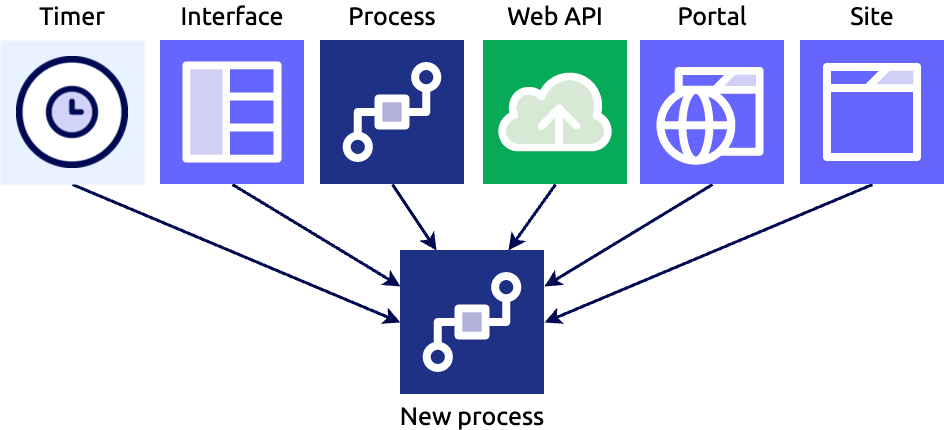
1.Starting a Process From Another Process
These are the methods you can use inside a process model to start another process:
🔹 Start Process Smart Service
- A smart service node that launches another process.
- Works asynchronously (continues current flow) or synchronously (waits for results).
- Can dynamically choose which model to start.
- Recommended in most cases.
- Compatible with autoscaling.
🔹 Subprocess Activity
- A BPMN activity that starts another process as a subprocess.
- Creates a parent–child relationship between the two processes.
- Allows passing variables by reference.
- Useful for reporting, chaining into a user task, or preserving security context.
- Not compatible with autoscale.
🔹 Process Messaging
- Use Send Message Event or End Event to trigger another process model that listens for messages.
- Useful for event-based or loosely coupled process triggers.
- Generally less capable than Start Process Smart Service and has more limitations.
2. Starting a Process from an Interface
You can kick off a process directly from UI interfaces in these ways:
🔹 a!startProcess()
- Expression function used in a saveInto (e.g., button) to start a process.
- Great for unattended operations and works with autoscale.
🔹 a!startProcessLink()
- Launches a process and navigates the user into initial chained forms.
- Shows start forms or chained user tasks.
- Does not support autoscaled processes.
🔹 Record Actions
- Configure a record type to allow record-based actions that start processes (like “Create” or “Update”).
- Can also be embedded in interfaces using a record action component.
3. Starting a Process Outside Appian
These methods allow external systems or events to launch Appian processes:
🔹 Web API calling the Start Process Smart Service
- External systems call a Web API, which in turn starts an Appian process.
🔹 Appian RPA
- Use Appian Robotic Process Automation to start a process.
- Sending an email can trigger a process (only for non-autoscaled processes).
🔹 Exposed as a Web Service
- Make a process model callable as a web service to start from another system.
4. Automatically Start a Process
You can have Appian start processes on a schedule or at specific times without manual or external triggers.
- Schedule start events in a process model (e.g., daily job or periodic sync).
- Useful for batch jobs and automated workflows
5. Starting from Tempo or Sites
For end-users accessing Appian through Tempo or Sites:
🔹 Record Actions
- Exposed record actions allow users to start processes contextual to data.
🔹 Application Actions
- Expose process models as actions in the Actions tab in Tempo or as Site pages.
- Good for user-initiated flows.
- Only for processes without autoscale.
JuniorSeniorProcess Models
Loading comments...