Question
Imagine you have a form with two optional fields. The requirement is that the user must fill out at least one of them, and the error message should only appear after the user clicks Submit. How would you implement this behavior in Appian?
A
Anonymous
January 9, 2026
122
Answer
To achieve this, I will be using a!validationMessage()
Here is sample code
a!localVariables(
local!phone,
local!email,
a!formLayout(
titleBar: "Example: Showing Form Errors on Submission",
contents:{
a!textField(
label: "Phone Number",
value: local!phone,
saveInto: local!phone
),
a!textField(
label: "Email Address",
value: local!email,
saveInto: local!email
)
},
buttons: a!buttonLayout(
primaryButtons: a!buttonWidget(
label: "Submit",
submit: true
)
),
/*
* This validation occurs at the form level and is useful when the form or
* section's validation checks are non-field specific.
*/
validations: {
if(
and(isnull(local!phone), isnull(local!email)),
a!validationMessage(
message: "You must enter either a phone number or an email address!",
validateAfter: "SUBMIT"
),
{}
)
}
)
)
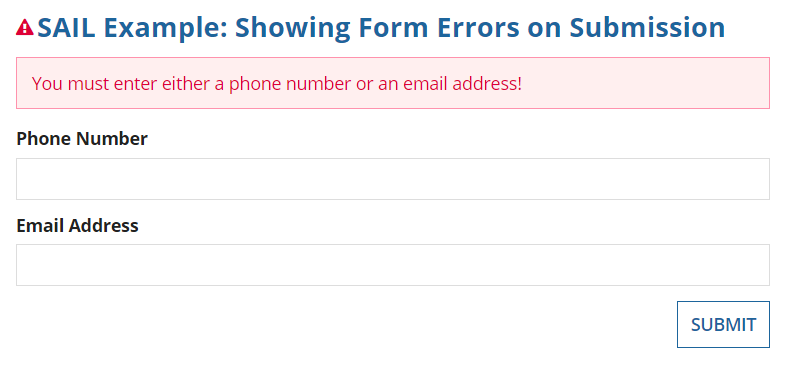
If email or phone both are null , it will throw validation on submit
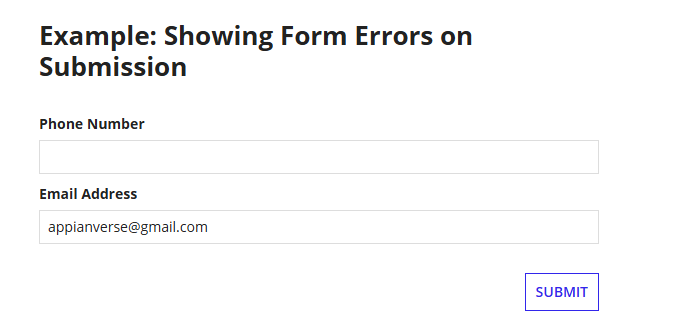
If I enter email ,the validation message will go off
JuniorInterfaces#secenrio_based
Loading comments...